MATTHEW BOGAN
Sound Design | Film | Television | Video Games


GAME AUDIO - CUBE DEMO
Year Three | UJ909004
In my third year of studies I complete a module titled 'Audio for Cinematic and Games 2'. This introduced the concept of sound design for video games. For years prior, video games had been a passion of mine as a pass-time activity and avid interest: following the latest news about releases and game development. This module provided the toolset required to operate the industry standard middleware Wwise, and demonstrate newly aquired skills in the 'Cube' demo.
Find below a description of the technical and creative process behind the completion of this assignment.
CUBE
What was unique about my project?
Section 1: Overall Layout
1. Actor-Mixer Hierarchy
The Actor-Mixer is a hierarchy created to group and organize all the audio assets within a project, this is where the project is started, and all editing and manipulation can be assigned from here.

This was broken into specific categories to ensure that organization was a key element of the project, the creation of several Work Units assigned to specific elements that needed to implement was the best suited solution. These categories include:
Body: audio for the splashing in and out of water audio were processed here.
Element: audio for the magic element of the game’s environment, the teleporter emitter.
Environment: ambient audiofound within each level, including underwater versions of each to be played when the player is submerged in water.
Footstep: with containers for both the player and each enemy. - Magic: audio for each magic attack from enemies.
UI: User-Interaction, audio that is assigned to all additional actions and pickups.
Vocal: audio for every vocal element from the player and enemies, including: Death, Grunt, Pain, and Jumping.
Weapon: audio for each weapon found within the game used by both the player and enemies.
These categories were colour coordinated and found within the Master-Mixer and Events sections of the Project Explorer.
2. Master-Mixer Hierarchy
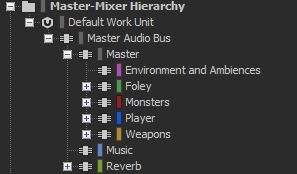
The Master-Mixer is a hierarchy forming a series of audio busses to align with the audio elements found within the Actor-Mixer hierarchy. This allows for elements to be grouped together, processed, and mixed in specific ways.

For organisation, the audio buses were categorised intothe main elements of the game:
Environment and Ambiences: all ambient elements and environmental elements.
Foley: all foley needed for actions such asjump pad usage, and items such as ammo pickups.
Monsters: all vocal and footstep elements used by the enemies.
Player: all vocal and footstep elements used by the player.
Weapons: all weapons found within the game, used by both the player and enemies.
Section 2: The Player
1. Footsteps
Footsteps were recorded on several materials; this was to cover all the material types found within the Cube game. Each were setup using a Sequence container, allowing for the footsteps to be played in a specific order.
However, it was found that the footsteps would trigger at a very fast pace – to solve this issue, a Wwise Silence element was introduced and would play between each footstep. Thus, allowing for a spacing between footsteps that resembled how one would walk in the real world.

2. Vocals: Attack Dialogue
To add variation to when the player attacks, unique dialogue was recorded to play. However, if this were to trigger after each independent attack it would become extremely repetitive.
To solve this, the probability slider was used to reduce how often this would trigger – allowing for a surprise every 5-10 times this is triggered.

3. Weapons: Rocket Launcher
The Rocket Launcher is fired within Cube as three separate elements: firing, flight, and impact. During implementation, audio for each stage was needed to make each stage significant to the player. The sound of a gun firing, steam and an explosion were recorded.
For the explosion audio to manipulate dependent on the players position, a blend container was used to blend two versions of the audio: a close version, and a far one. Within Cube, explosions are experienced much like in the real world.
This same principle was used for the magic projectiles, such as the Fireball or Slimeball, and for footsteps of the large enemies - making the player perceive them as more of a threat.

4. Weapons: Punch
The punch was implemented like any other audio element and operates perfectly. However, there is no variationfor materials that are hit by the punch –meaning that audio played for punching a wall, an enemy, and missing completely, are all the same.
5. Death
When the player dies within the game, a unique vocal element is triggered showing that the character has met his demise. However, this could not be heard over all other audio elements.
To allow for this to be heard and make an impact on the player, all other audio elements are AutoDucked – then after a period the audio is reintroduced to remind the player that the game is still to be played.

Section 3 - Monsters
1. Idle Vocal Auto-Ducking
When idle, looping audio is triggered for the enemies, this is to allow the player to locate the enemies when not in combat. To prevent this looping audio to trigger over other vocal elements, Auto-Ducking was used to eliminate this.

Section 4 - Reverb Buses
Each level features a variety of environments, the player moves between wide open spaces and tight corridors. To simulate this, Reverb buses were created to process all selected audio is manipulated. These include: Room Small, Room Medium, Room Large, Corridor, andOutside. Each have their own independent set of variables.

2. Reverb Zones
For audio to be processed in specific areas of the game world, Cubes edit feature was used. This involved manipulating the code found within the games data files, creating commands that indicate which bus must be used.
The command “setwwiseenv 1” was used for the small room, each numerical value responds with the statements displayed above

Section 5 - Interactive Music
Electronic music loops were created within Pro Tools, these were designed to reflect the different states that the player finds themselves, these being: Exploring, Combat, Boss Battles, and while using a Power Up. For these to correctly trigger a Music Switch Container was used.
Within the Interactive Music layout, Game States can be assigned to the container, the states seen above were selected. Wwise will generate all possible combinations of situations that the player can be found within. Which music that is triggered is selected from the Switch Container. Each transition in triggered on the next possible bar, with a fade in and fade out time defined.

Related images that provide extra detail of the audio development can be found below.